How do I welcome new members with something free?
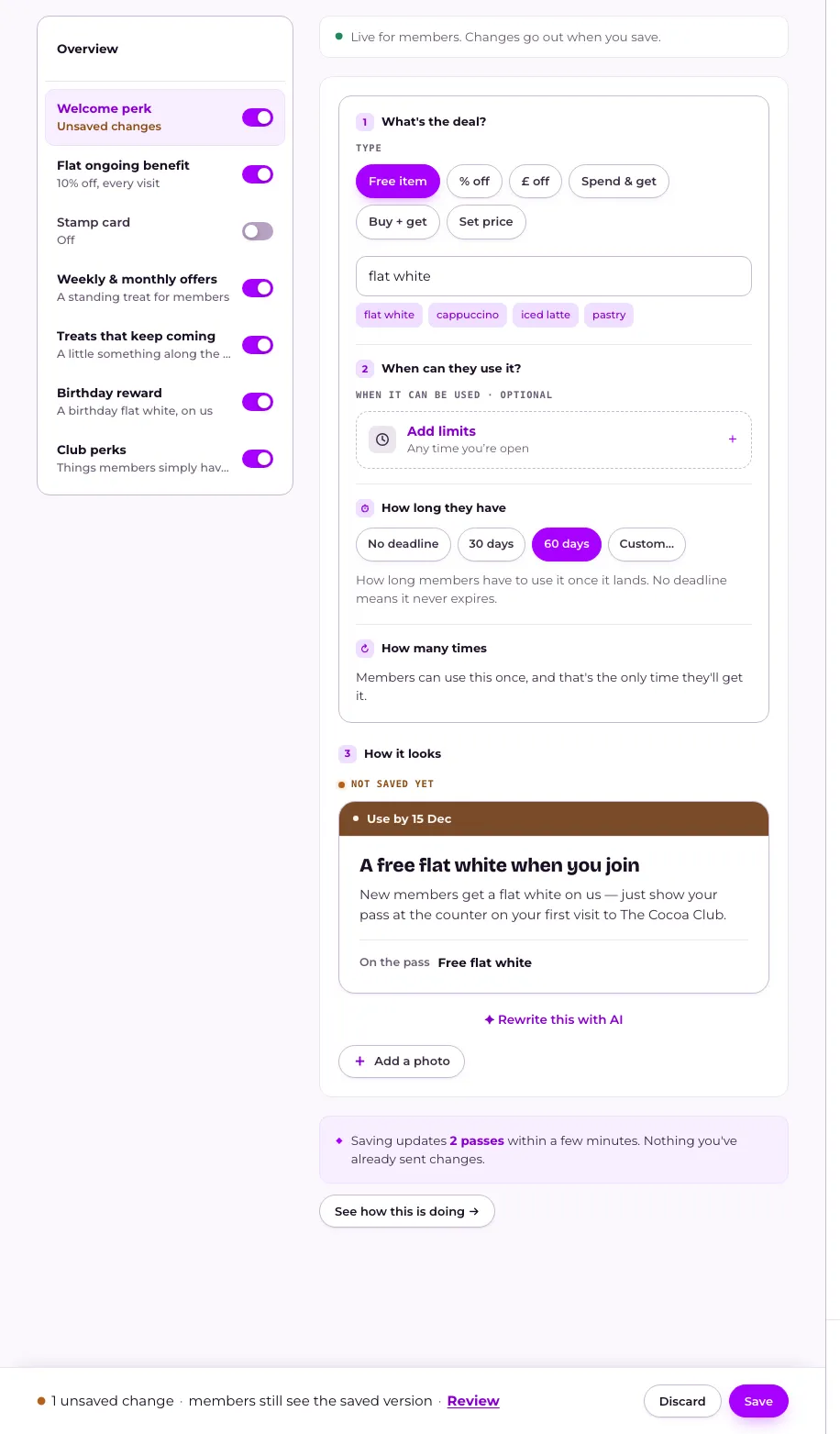
Open Your club, press Welcome perk in the menu on What members get, then choose what it gives and press Save. It lands on a member's pass the moment they join, and each member only ever gets it once.
Last checked 14 October 2026
Give every new member something free the moment they join. Open Your club, press Welcome perk in the menu on What members get, and set what it gives.
- Open Your club → What members get and press Welcome perk in the menu on the left. If it says Switched off, press Switch on and set it up.
- Under Type, choose what it gives: Free item, % off, £ off, Spend & get, Buy + get or Set price. Then fill in the details: for a free item, type what it is, or tap one of the suggestions.
- Under When it can be used, press Add limits if you only want it usable at certain times — see Making an offer work only on certain days or hours.
- Press Save in the bar at the bottom of the page. On a phone, an offer opens in a full-screen editor: step through it and press Save at the top right. Until then, members still see the saved version. See When do members see the changes I make?
What happens next
Section titled “What happens next”A welcome perk lands on a member’s pass the moment they join — there’s no schedule to wait for. Each member only ever gets it once. By default, members get 30 days to use it once it lands. On a computer, change that under How long they have, or choose No deadline and it never expires.
Changing the welcome perk only affects members who join from now on. Turning it off with its switch on What members get stops it reaching anyone new. If members already hold it and haven’t used it, we ask whether They keep it or Take it back. See How do I take an offer back?
How members hear about it reads Told in your welcome message, because a new member is told about your welcome perk, and everything else they got, in one message. Press Change to set it on the What members hear tab. See What do new members hear when they join?
Related
Section titled “Related”© Flub 2026 | What's new | useflub.com
Flub is a trading name of FLUB INDUSTRIES LTD, a company registered in England and Wales (no. 17491066). Registered office: The Workstation, 15 Paternoster Row, Sheffield, S1 2BX, United Kingdom.