How do I choose the fonts on my club pages?
Open Your club, then Look, and find Fonts. Press Change next to Headings or Body, pick a font, then press Save in the bar at the bottom of the page. Or ask Tweak your club, for example "make our headings feel more vintage", and it fills Fonts in for you to save. Your join page, sign-up form and members' club page use them from then on. Wallet passes keep their own fonts.
Last checked 14 October 2026
Your club has two fonts: one for headings and one for everything else. Change either in Your club, under Look, and press Save.
- Open Your club → Look.
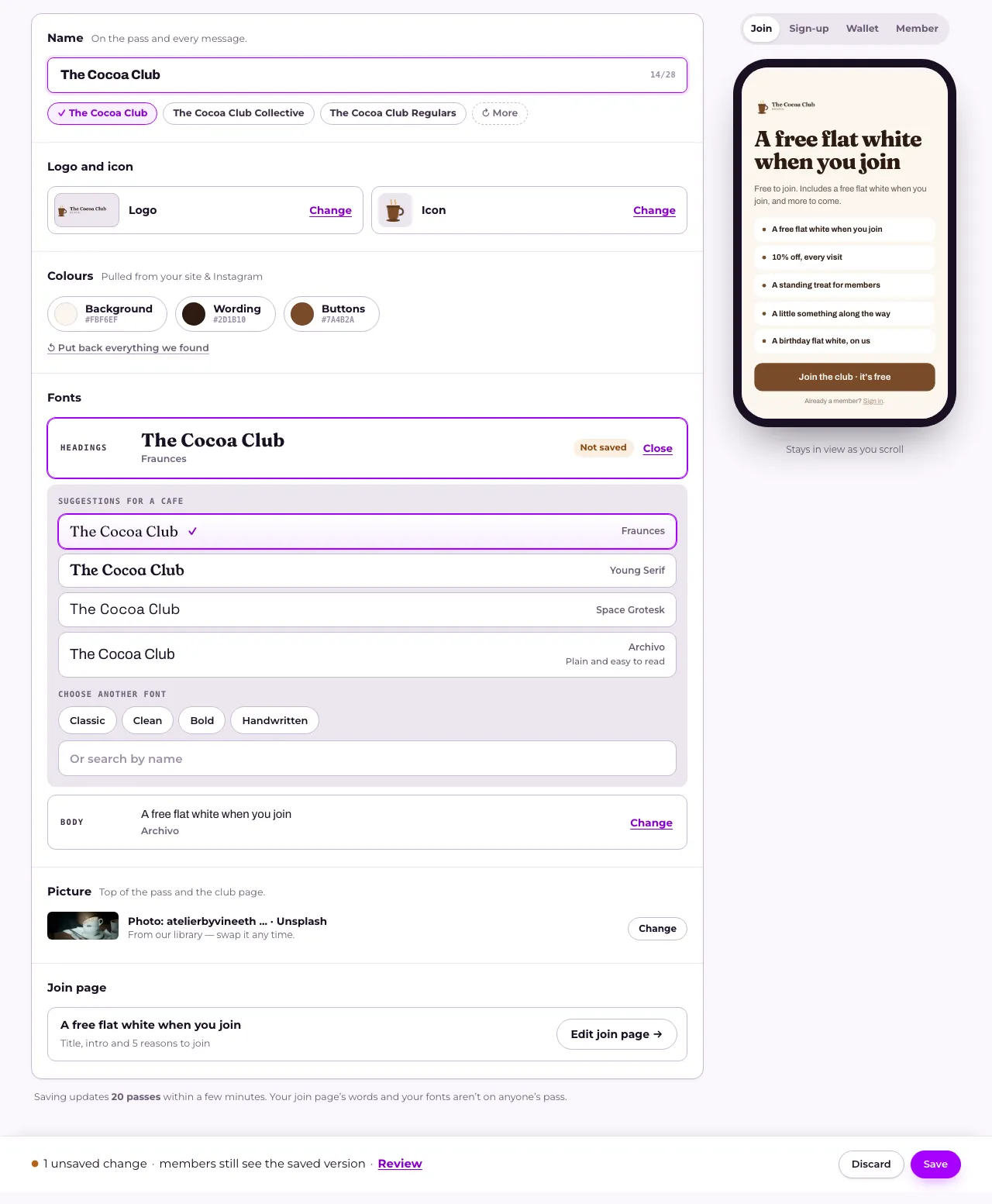
- Find Fonts. It shows Headings and Body, each written in the font it uses now.
- Press Change next to the one you want.
- Pick a font. From your site is the one we found on your website. Then come a few suggestions for your kind of place (like Suggestions for a cafe), and Archivo, our plain standard.
- Want something else? Under Choose another font, browse by feel with Classic, Clean, Bold or Handwritten, or type a name in Or search by name.
- Your pick says Not saved and shows in the preview beside it. Press Save in the bar at the bottom of the page.
On a phone, press See it on your join page to check it first.
Asking for a font instead
Section titled “Asking for a font instead”You can also ask Tweak your club, the panel beside Look, in your own words: “make our headings feel more vintage”, “something rounder” or “a font more like the one on our website”. It picks a font that fits, fills it in under Fonts and the preview shows it. Press Save to keep it, as with any change you make yourself.
If you pick a font for Body that’s hard to read in longer text, we suggest a Clean or Classic one instead. You can still save it.
Where your fonts show
Section titled “Where your fonts show”On your join page, the sign-up form and your members’ club page. Anyone opening them after you save sees the new fonts.
Wallet passes don’t change. Apple Wallet and Google Wallet use their own fonts, which is why the preview’s Wallet tab says “Wallets use their own fonts.” Saving a font never sends an update to anyone’s pass.
Where they come from
Section titled “Where they come from”When we build your club from your website, we use the fonts it uses for headings and body text. Fonts says “Taken from your site.” If your site uses a font we can’t serve, we pick the closest one we can. When we can name your site’s own font, Fonts says “Matched to your site.” instead, with “closest to” and that font beside it. If we couldn’t find any fonts, we start you on a pair that suits your kind of place.
Clubs that were already running before club fonts arrived use Archivo, our standard font. Fonts says “Archivo, until you choose.” until you pick something else.
A copied club starts with the same fonts as the club it came from.
Related
Section titled “Related”© Flub 2026 | What's new | useflub.com
Flub is a trading name of FLUB INDUSTRIES LTD, a company registered in England and Wales (no. 17491066). Registered office: The Workstation, 15 Paternoster Row, Sheffield, S1 2BX, United Kingdom.