How do I check a member's pass and what they've used?
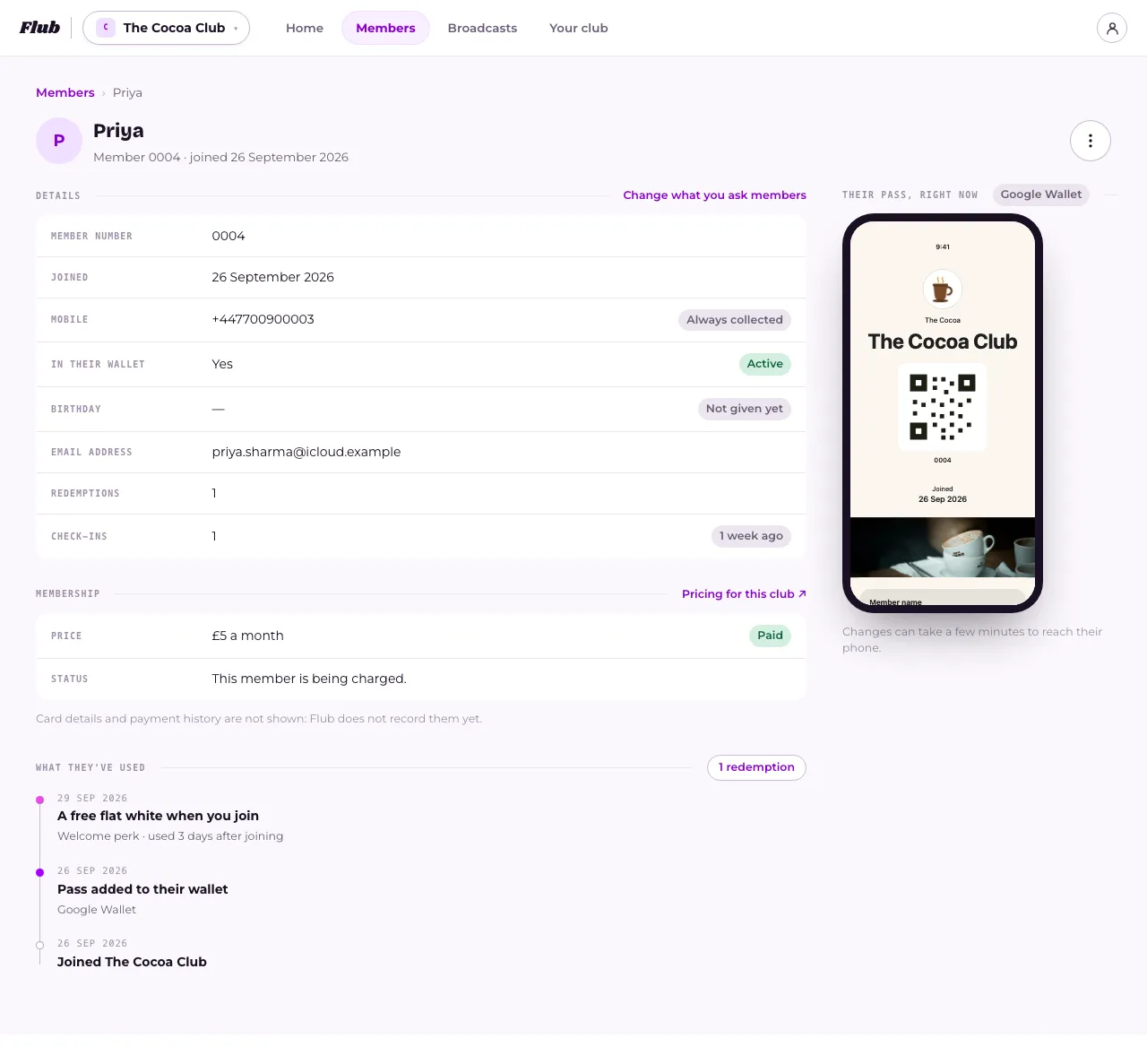
Open Members and press the member's name. Their page shows whether their pass is on their phone, what they've redeemed and when, and, on a paid club, whether they're paying. The ⋯ menu at the top lets you message them, resend their pass or remove them.
Last checked 15 October 2026
Open Members and press the member’s name. Their page answers the usual questions: is their pass on their phone, what have they used, and are they paying.
- Open Members and find them. See How do I find a member?
- Press their row to open their page.
- Check In their wallet under Details to see whether their pass is on their phone right now.
- Look at Activity to see what they’ve used. What they’ve used counts their redemptions.
On a phone, Details, Pass and Activity are tabs at the top of the page. On a computer, you see all three at once.
What you’ll find
Section titled “What you’ll find”Details has their member number, when they joined, their mobile, and anything else your club asks for, like an email address or a birthday. A question they haven’t answered shows Not given yet.
Beside their name you may see a tag: Test for a test signup or a member of the Flub team, Complimentary and Not counted · Your team for someone who joined on a free invite, or Gift membership for someone whose membership was a gift.
Pass shows their wallet pass exactly as it looks right now, once it’s on their phone. If it isn’t, you’ll see why, and a way to send it again.
Activity lists everything on record for them, newest first: when they joined, each redemption, a name change, and when their pass was added to or taken out of a wallet. For a gift membership it also shows when they opened it, the two reminders we send before it ends, and the day it ends.
If your club charges for membership, Membership shows what they pay and whether it’s up to date. A free-invite member’s Price reads Complimentary. For a gift membership it also shows who it’s from (Given by), when it was Bought and Opened, when it Ends, and what happens After that: on hold, unless they carry on with a card. See What does a member’s Membership status mean?
What you can do from here
Section titled “What you can do from here”Press ⋯ at the top of the page for:
- Message member: opens a new message already addressed to just them. See How do I message just one member?
- Resend link & pass: see How do I resend a member’s pass link?
- Remove from club: see How do I remove a member from my club?
Related
Section titled “Related”© Flub 2026 | What's new | useflub.com
Flub is a trading name of FLUB INDUSTRIES LTD, a company registered in England and Wales (no. 17491066). Registered office: The Workstation, 15 Paternoster Row, Sheffield, S1 2BX, United Kingdom.