How do I send a series of treats to new members over their first few months?
Open Your club, press Treats that keep coming in the menu on What members get, choose how long it should run, then add a step for each treat and when it arrives after joining, and press Save. Flub can draft the whole thing for you, or you can start from blank steps.
Last checked 14 October 2026
Send a run of treats that unfolds over a new member’s first few months, so there’s always something to look forward to. Open Your club and press Treats that keep coming in the menu on What members get.
- Open Your club → What members get and press Treats that keep coming in the menu on the left. If it says Switched off, press Switch on and set it up.
- The first time, choose Draft the journey for me for a full set of steps to start from, or Start from blank steps to build your own.
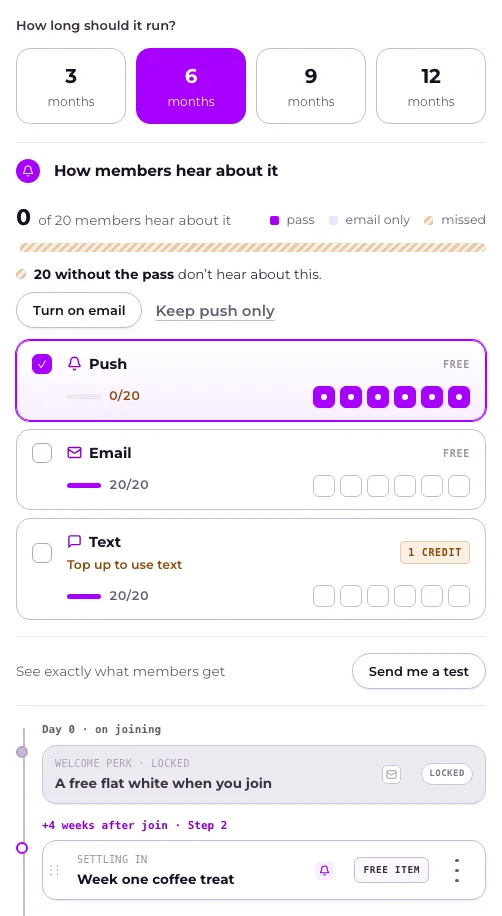
- Under How long should it run?, choose 3, 6, 9 or 12 months. Changing this later reschedules the existing steps rather than adding new ones.
- Press a step to open it, and set what it gives the same way as any other offer. A step that says No offer yet — choose one gives members nothing until you press Choose an offer.
- Press Add another step for more, or use a step’s ⋮ menu to move it or Remove step.
- Press Save in the bar at the bottom of the page. On a phone, an offer opens in a full-screen editor: step through it and press Save at the top right. See When do members see the changes I make?
You can also ask Tweak your club to move a step to another week, change what it gives, or reorder the steps. It fills in the page and you press Save.
A removed step stays on the timeline saying Removed when you save, with Undo. If members already hold it, saving asks first, in Before you save: it names the step that “stops going out” and how many members already have it. Choose They keep it (picked for you) or Take it back, which turns Save into Save and take it back. See How do I take an offer back?
What happens next
Section titled “What happens next”Day 0 is always the Welcome perk, and it’s locked here — change what it gives from the Welcome perk itself. Every step after that fires the set number of weeks after someone joins, whatever cadence you’ve chosen.
A member already partway through the journey keeps going on the steps as they were when each one reached them; removing a step stops it reaching anyone new. Members who already hold it keep it, unless you choose Take it back.
How members hear about it is set once for the whole journey. A step can go its own way, and Use the journey’s puts it back. Day 0 is your welcome message: its channels show greyed out, and you change them on the What members hear tab. See How do my members hear about an automated offer?
Related
Section titled “Related”© Flub 2026 | What's new | useflub.com
Flub is a trading name of FLUB INDUSTRIES LTD, a company registered in England and Wales (no. 17491066). Registered office: The Workstation, 15 Paternoster Row, Sheffield, S1 2BX, United Kingdom.