How do I launch my club?
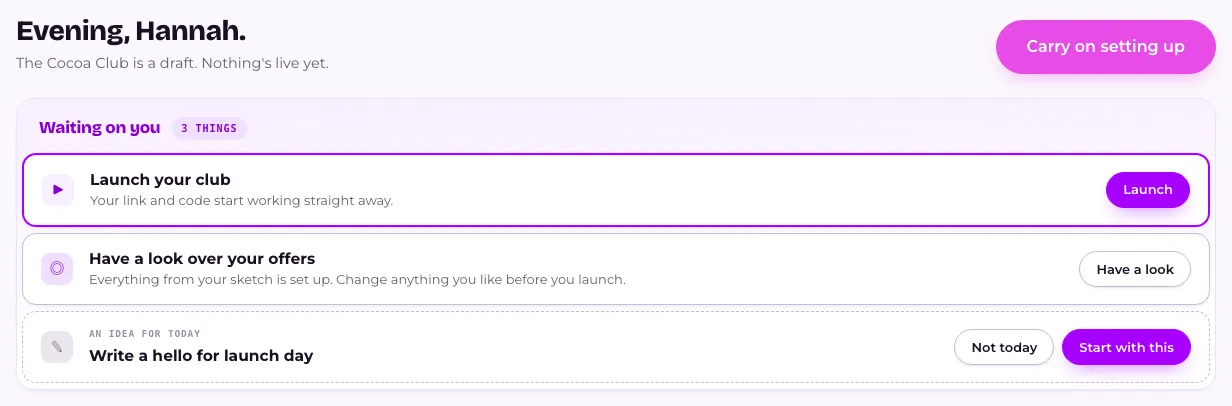
Press Launch on Home, next to Launch your club, and people can join straight away. Your club needs at least one thing switched on in What members get. Add your legal details first, and if your club charges for membership, set a price and connect where the money lands, because a paid club can't open without them.
Last checked 6 October 2026
Press Launch on Home, next to Launch your club, and people can join from that moment. Check what members get and add your legal details first. A paid club also needs a price and somewhere for the money to land.
- Open Home. Until you launch, Launch your club waits for you there.
- Check what members get in Your club, and make sure at least one thing is switched on. Until you’ve looked, Home shows Have a look over your offers with a Have a look button.
- Press Add them on Add your legal details, or open Your club → Settings → Legal details. Fill in Business name, Business address and, if you have one, Company number. Press Save.
- If your club is paid, press Set that up on Set up where the money lands. You’ll need your bank details, business details and a photo of your ID: about 15 minutes.
- Still on a paid club, press Set a price on Set a price for membership. See How do I charge for membership?
- Want to check it first? Try it as a member.
- Back on Home, press Launch on Launch your club.
On a computer you can also launch from Your club: press Launch → in the bar along the bottom of What members get. On a phone, launch from Home.
If it won’t launch
Section titled “If it won’t launch”- “Switch on at least one thing members get before you launch.” Switch something on in What members get, then press Launch again.
- “Give your club a name before you launch.” Press Go to Look, give it a name and save.
- A paid club that can’t take money yet shows Everything’s built. Nobody can join yet. on Home, with the steps still to do. I’ll do it later shows the rest of Home meanwhile.
What happens next
Section titled “What happens next”Members can join the moment you launch. Your join link and QR code stop saying “Not open for members yet.” and start taking members straight away. A code you’ve already printed keeps working, because it’s the same one. From now on, renaming your club doesn’t change its web address.
Your legal details go on your club’s privacy policy and member terms. They don’t stop you launching, but the law wants them there.
Related
Section titled “Related”© Flub 2026 | What's new | useflub.com
Flub is a trading name of FLUB INDUSTRIES LTD, a company registered in England and Wales (no. 17491066). Registered office: The Workstation, 15 Paternoster Row, Sheffield, S1 2BX, United Kingdom.