How do I get my first members?
Open Your club, then Sharing. Print your QR code and put it where people will see it, and copy your join link wherever your customers are. Sharing also has ready-made lines to post or say. You can share before you launch; the page opens to members when you do.
Last checked 10 October 2026
Put your QR code somewhere people can see it and share your join link. Everything you need is in Your club, under Sharing, and it takes a few minutes.
Before you start
Section titled “Before you start”You can print and share before you launch. Until then, anyone who scans your code or follows your link sees “Not open for members yet.” The page opens by itself the moment you launch, so nothing needs reprinting.
Settle on your club’s name first. Until you launch, the link follows the name, so renaming changes it. An old link still sends people to the right place for 90 days.
- Open Your club → Sharing.
- Under Your code, press Or a printable sheet (PDF). It’s a sheet ready to print, with your club’s name, the code and your link for anyone who’d rather type.
- Print it and put it somewhere people can see it: the counter, the door, the bottom of a receipt.
- Under Your link, press Copy and paste it wherever your customers are: your website, socials, receipts.
- Under What to say (on a phone, tap What to say to open it), press Copy next to a line for At the till, your Instagram bio or A text or WhatsApp.
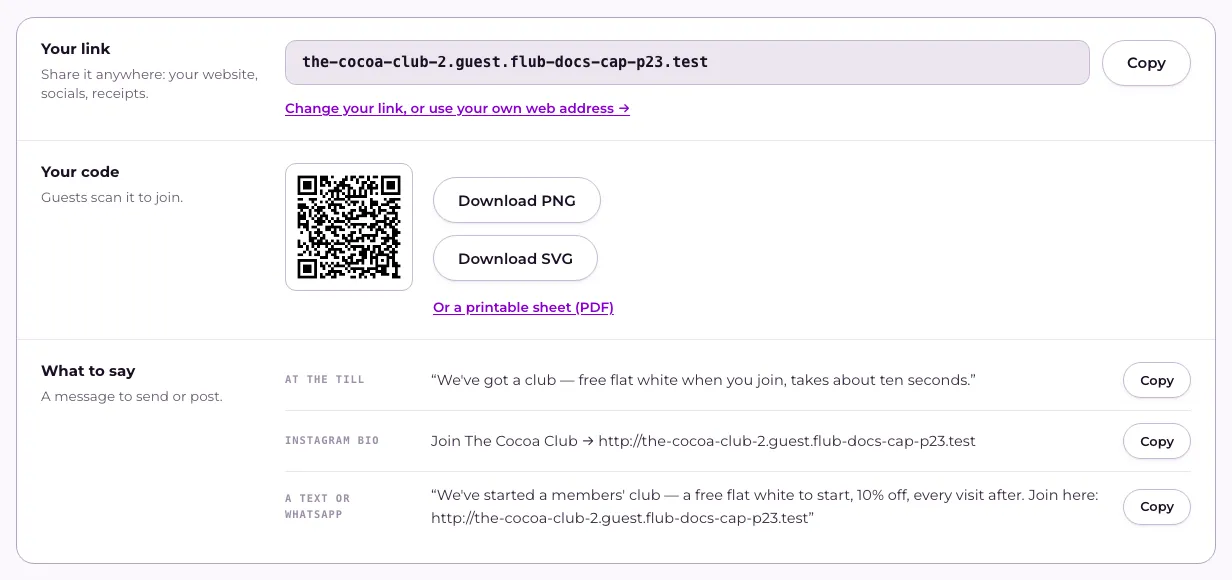
Want the code on its own, for a menu or a poster? Press Download PNG, or Download SVG if your printer or designer wants a file that stays sharp at any size. On a phone, press Save to Photos for the code, and Share… to send your link straight from your phone.
To change the address itself, press Change your link, or use your own web address. See How do I use my own web address instead of flub.to?
What happens next
Section titled “What happens next”When someone scans your code, they see your join page and a short sign-up form, then get a pass for their phone’s wallet. There’s no app to download.
New members appear on Home under Latest to join, and in Members. Until your first one arrives, Home shows Put your code somewhere people can see it, with Copy the link and Get the code buttons, so it’s never far away.
Related
Section titled “Related”© Flub 2026 | What's new | useflub.com
Flub is a trading name of FLUB INDUSTRIES LTD, a company registered in England and Wales (no. 17491066). Registered office: The Workstation, 15 Paternoster Row, Sheffield, S1 2BX, United Kingdom.