How do I copy a club for a new site?
Press the club switcher, then Start another club, and choose Copy. Type a name for the new club and press Make the copy. Its offers, look, join page, fonts and price come across; its members, link, QR code, staff PIN and team stay with the original. The copy is a draft until you launch it.
Last checked 10 October 2026
Opening a second site and want the same club there? Copy the one you have. You only need to give the new club a name, and the original isn’t touched.
- Press the club switcher at the top left of your dashboard, then + Start another club.
- Press Copy and the club’s name (or Copy a club you have if you run more than one).
- If asked Which club should we copy?, pick it under Copy from.
- Under What’s the new one called?, type a name members can tell apart from the original, like “The Cocoa Club, Hove”.
- Press Make the copy.
You land in the new club’s Your club, which says Here’s what came across.
What comes across
Section titled “What comes across”Press What comes across? before you copy to see the list for yourself.
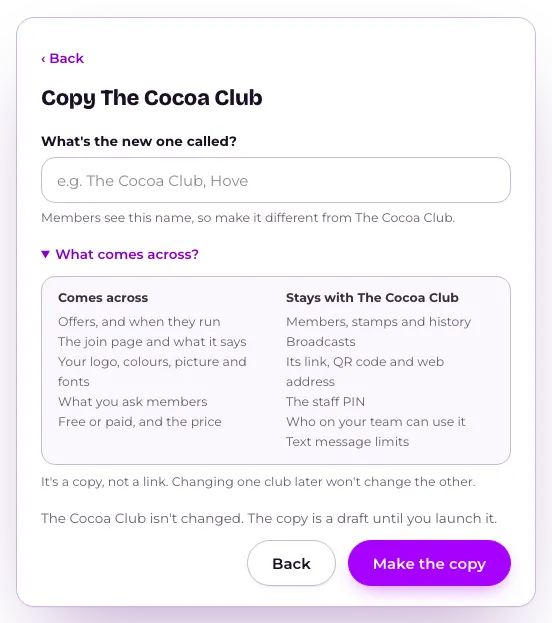
- Comes across: offers and when they run, the Stamp Card, the join page and what it says, your logo, colours, picture and fonts, what you ask members, and free or paid with the price.
- Stays with the original: members, their Stamp Card progress and history, broadcasts, its link, QR code and web address, the staff PIN, who on your team can use it, and text message limits.
The new club gets its own link and QR code in Sharing, and its own staff PIN. If teammates should use it, give them access on your team list.
It’s a copy, not a link: changing one club later won’t change the other.
What happens next
Section titled “What happens next”The copy is a draft until you launch it. Check anything that’s different at the new site first, like its opening hours on offers or where the club is.
If you already have a club with that name, you’ll see “You already have a club called” followed by the name. Pick one members can tell apart.
Related
Section titled “Related”© Flub 2026 | What's new | useflub.com
Flub is a trading name of FLUB INDUSTRIES LTD, a company registered in England and Wales (no. 17491066). Registered office: The Workstation, 15 Paternoster Row, Sheffield, S1 2BX, United Kingdom.