How do I take an offer back from members who haven't used it?
Switch the offer off, or remove its step or schedule, then choose Take it back when we ask. It disappears from your members' pages and can't be used. Anyone who already used it keeps it in their history.
Last checked 14 October 2026
You’ve stopped an offer, but members who already have it can still use it. Switch the offer off, or remove its step or schedule, and when we ask, choose Take it back.
- Open Your club → What members get and press the switch beside the offer in the menu. To end one step or schedule instead, press Remove step on a journey step, or ✕ Remove on a weekly or monthly schedule, then press Save.
- If members hold the offer and haven’t used it, we ask first. Switching off brings up Switch off …?. Saving a removal brings up Before you save. Both show how many members have it.
- Choose Take it back. They keep it is picked for you, so nothing is taken back unless you choose it.
- Press Switch off and take it back, or Save and take it back.
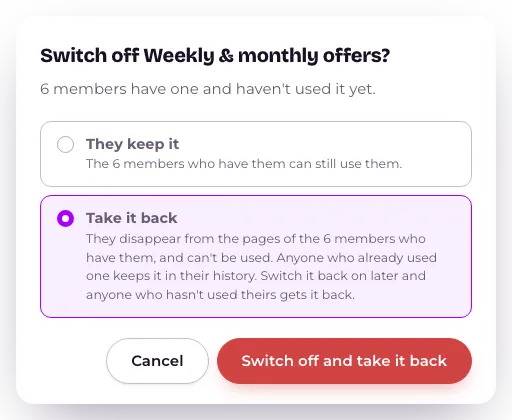
You’ll see “Taken back from N members.” If nobody holds the offer, there’s no question.
You can also switch a schedule off from its own page under Broadcasts, and the same question comes up.
What happens next
Section titled “What happens next”The offer disappears from those members’ pages and can’t be used at the counter. Anyone who already used it keeps it in their history. Taken-back offers show there as Withdrawn.
Switch the offer back on later and anyone who hasn’t used theirs gets it back. You’ll see “Given back to N members.”
A Flat ongoing benefit is never used up, so taking it back removes it from every member who has it.
The Stamp Card, Club perks and anything you’ve sent from Broadcasts are not touched.
If you ask Tweak your club to switch something off that members hold, it asks you first. When it removes one step or schedule of several, it tells you that Save will ask.
Related
Section titled “Related”© Flub 2026 | What's new | useflub.com
Flub is a trading name of FLUB INDUSTRIES LTD, a company registered in England and Wales (no. 17491066). Registered office: The Workstation, 15 Paternoster Row, Sheffield, S1 2BX, United Kingdom.