How do I change the number on the Stamp Card?
Change the count on the Stamp Card's own page and press Save. If nobody has a card on the go, it just saves. If people do, Before you save asks whether their cards finish on the old count or move to the new one.
Last checked 6 November 2026
Change the count on the Stamp Card’s own page, then press Save. If any member already has a card on the go, we ask what happens to it before anything saves.
- Open Your club → What members get and press Stamp card in the menu on the left.
- Change how many stamps a card needs.
- Press Save in the bar at the bottom of the page.
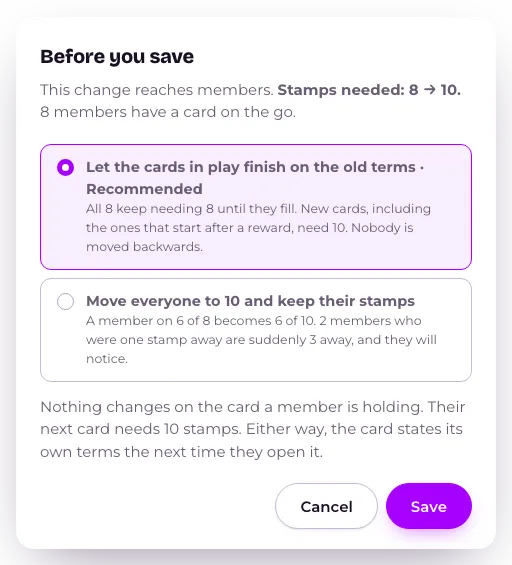
- If anyone has a card on the go, you’ll see Before you save, with how many stamps a card needs now and after, and how many members have a card on the go. Choose one:
- Let the cards in play finish on the old terms (Recommended): nobody already holding a card is moved. New cards, including the one that starts after a reward, use the new count.
- Move everyone to 10 and keep their stamps (with your new count in place of 10): every card in play switches to the new count, keeping the stamps already on it. If you’re raising the count, anyone who was one stamp away is suddenly further away, and will notice.
- Press Save, or Cancel to go back with nothing saved.
With nobody on a card yet, step 4 doesn’t come up: the new count just saves.
What happens next
Section titled “What happens next”Whichever you choose, the reward stays the same. Only the count changes. A member’s card states its own terms the next time they open it, so nobody is told anything different from what their card now says.
Saving reaches every card in play, and every wallet pass showing one, within a few minutes.
Related
Section titled “Related”© Flub 2026 | What's new | useflub.com
Flub is a trading name of FLUB INDUSTRIES LTD, a company registered in England and Wales (no. 17491066). Registered office: The Workstation, 15 Paternoster Row, Sheffield, S1 2BX, United Kingdom.