How do I see every offer I've made, and send one again?
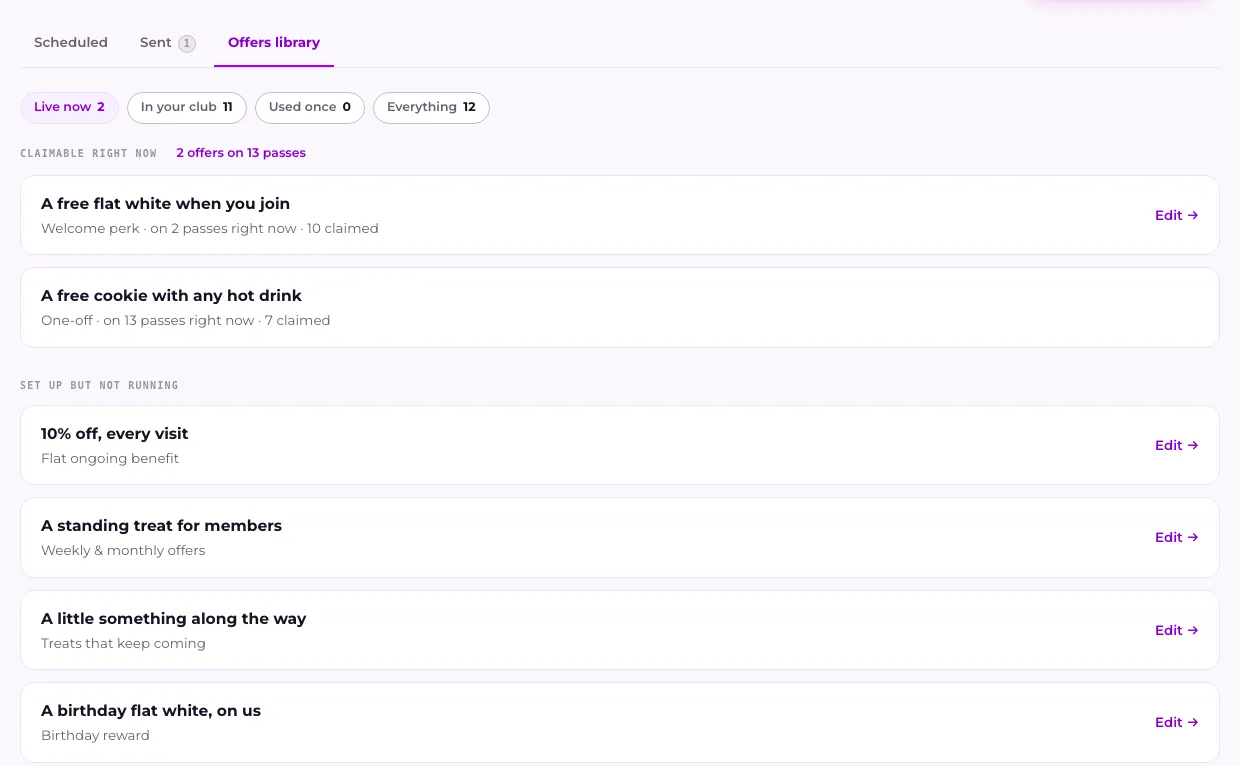
Open Broadcasts and press the Offers library tab. It lists every offer your club has made, grouped by what each one is doing, and says how many are claimable on members' passes right now. Press Use again next to one you're not using to send it in a new message.
Last checked 6 October 2026
Open Broadcasts → Offers library. Every offer your club has made is there, grouped by what it’s doing right now, with Use again on the ones you can send again.
- Open Broadcasts → Offers library.
- Find the offer. The counts at the top show how many are Live now, In your club, Used once and Everything.
- Press Use again next to it. A new message opens with that offer attached.
- Choose who gets it and send it, the same as any other message.
What’s in each group
Section titled “What’s in each group”- Claimable right now: sitting on at least one member’s pass, waiting to be used. The heading says how many offers that is, on how many passes.
- Set up but not running: part of something in What members get that isn’t sending today, like a birthday reward between birthdays. Press Edit to open it in Your club.
- Made once, not in use: sent once and finished with. These are the ones with Use again.
Sending one again makes a fresh copy, so the original and anything members already hold don’t change.
Only real members are counted. When you try your own club with See it as a member, that doesn’t add to the numbers.
Related
Section titled “Related”© Flub 2026 | What's new | useflub.com
Flub is a trading name of FLUB INDUSTRIES LTD, a company registered in England and Wales (no. 17491066). Registered office: The Workstation, 15 Paternoster Row, Sheffield, S1 2BX, United Kingdom.