What happens when Flub builds my club?
At app.useflub.com/try we sketch a whole club from just the kind of place you run, or from your website, in about ten seconds. Add your website afterwards to make it look like yours. Change it by chatting before you sign up. When you create your account, the sketch becomes your club as a draft, and nothing goes live until you launch.
Last checked 24 October 2026
We sketch a whole club for you in seconds, let you change it by chatting, then hand it over as a draft when you create your account. Nothing goes live until you launch it.
How it works
Section titled “How it works”At app.useflub.com/try, tell us what kind of place you run. A website is optional. We sketch your club as the sign for your counter: what members get, a name, colours and fonts.
- Just a kind of place. You get a sample club called Your Café Club (or Your Pub Club, and so on), with perks that suit that kind of place.
- With your website. We use your venue’s name, colours and fonts from your site.
Started without a website? Use Make it look like yours above the sign: add your website and press Use it. The sign takes your name, logo, colours and fonts, and the club keeps its perks and any changes you’ve made. No website at all? Press Just tell us what it’s called and type your venue’s name: the club takes your name straight away. If you add a website after that, it keeps the name you typed. If you have an idea to start from, choose Got an idea? Tell us at app.useflub.com/try/idea and add it.
Before you sign up, you can:
- Change it by chatting. Type what you’d like in Tweak your club, beside the sign: a different perk, a price, a name, colours or fonts. Changes show on the sign as you go, and Undo takes back the last one. Not sure? Ask for ideas and press Use this on one you like.
- Take a perk off. Press × next to it. If there are more than fit, press + 2 MORE (or however many) to see the rest.
- Try it as a guest. Scan the code on your sign with your phone, join the way a guest would and look round the member page.
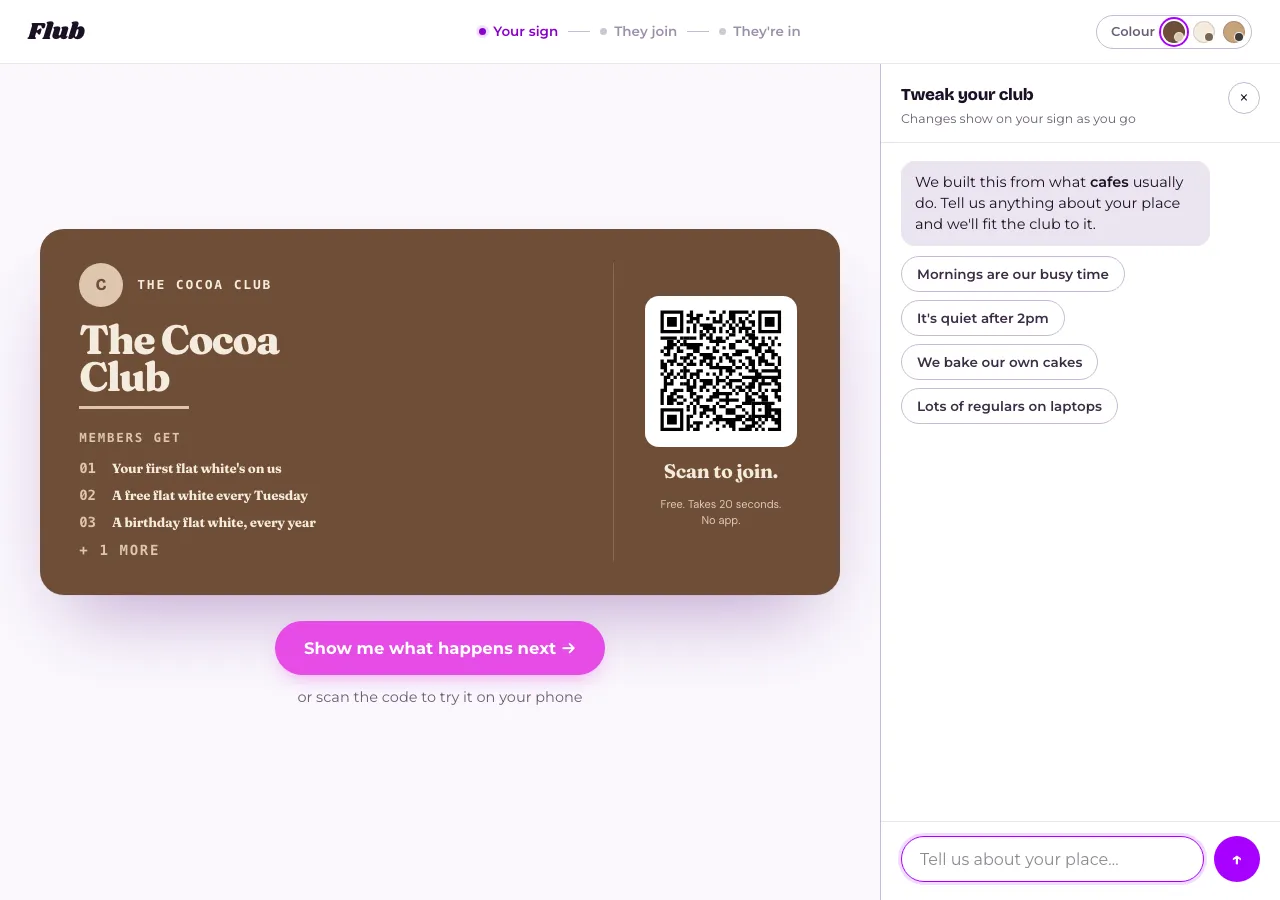
We keep the details of your idea. A condition staff can see, like wearing a gilet, stays in the perk for them to check at the till. Things your team can honour by looking at a member’s pass, like a members-only special or first dibs on tables, become perks too. If you name a colour, we use it. Tweak your club opens beside your sign with what we set up from your idea. If we had to guess something that matters, it asks one quick question: tap an answer. And if you ask for something Flub can’t do yet, like online booking, press Request it and we’ll hear about it.
If your club charges a monthly price, we make sure members get their money back in a normal month: if your idea doesn’t already have one, it gets one main perk that suits your kind of place, like a free coffee every Tuesday at a café or 50p off every pint at a pub. The starting price suits your kind of place too, like £5 a month for a café or pub. Change either in Tweak your club.
Want to post your members a treat, like brownies every month? Ask for it in your idea or in Tweak your club. Your club then asks members for their postal address when they join, and you post the treats yourself. You’ll find each member’s address on their page in Members, and in the members export.
What you get
Section titled “What you get”When you create your account, the sketch becomes your club. The next page says it’s yours, with two things to do: Have a look over your offers, then Launch.
- Your offers, in Your club. The first time you open it, they’re under Here’s what we set up. They start without photos: add one whenever you like.
- Your name, colours and fonts, in Look. There’s no logo yet, so your club shows its first letter until you upload one. If you never gave a website or a name, your club is unnamed and you choose its name here.
- Your join link and QR code, in Sharing.
What you can change
Section titled “What you can change”Everything. While your club is a draft, Your club says Nothing goes live until you launch. To see it the way a member will, try it as a member.
Until you launch, your club’s web address follows its name, so renaming it changes the link too. Once it’s live, the link stays put.
Related
Section titled “Related”© Flub 2026 | What's new | useflub.com
Flub is a trading name of FLUB INDUSTRIES LTD, a company registered in England and Wales (no. 17491066). Registered office: The Workstation, 15 Paternoster Row, Sheffield, S1 2BX, United Kingdom.