How do I sell gift memberships?
In Your club, open Settings, then Gift memberships, and switch on Sell gift memberships. Buyers pay once for a fixed length, the recipient's months start when they open it, and nothing renews. You see sales under Members, and refunds are made in Stripe.
Last checked 12 October 2026
If your members keep asking to give membership as a present, you can sell it. A buyer pays once for a fixed length, and nothing renews. Only a paid club can sell them.
- Open Your club → Settings, then Gift memberships under Joining.
- Switch on Sell gift memberships. This adds “Give it as a gift membership” to your splash and join pages.
- Under Lengths and prices, tick the lengths you want to sell, from 3 to 24 months. We suggest prices from your own monthly and yearly prices. Change any of them and it saves as you go.
- Under Time to open it, choose how long the recipient has to open it. Their months only start once they do.
- Leave Send on a chosen date on to let buyers pick a day for it to be emailed, at 8am.
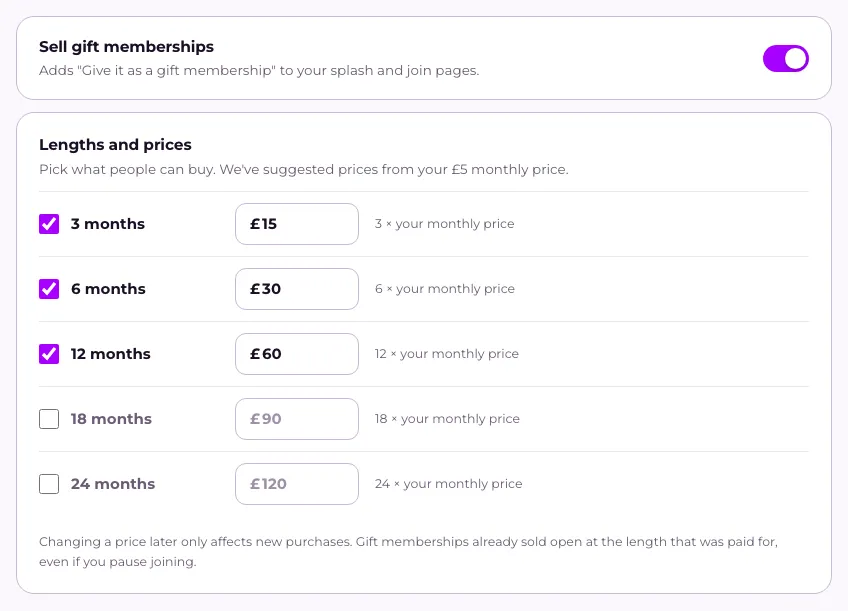
A later price change only affects new purchases. Gift memberships already sold still open at the length paid for, even if you pause joining.
What happens next
Section titled “What happens next”The buyer pays once, with no account. The recipient opens their link, joins the way anyone does, and pays nothing. A gift member doesn’t get your free trial. If they already pay for a membership, the gift is added on and their next payment moves later.
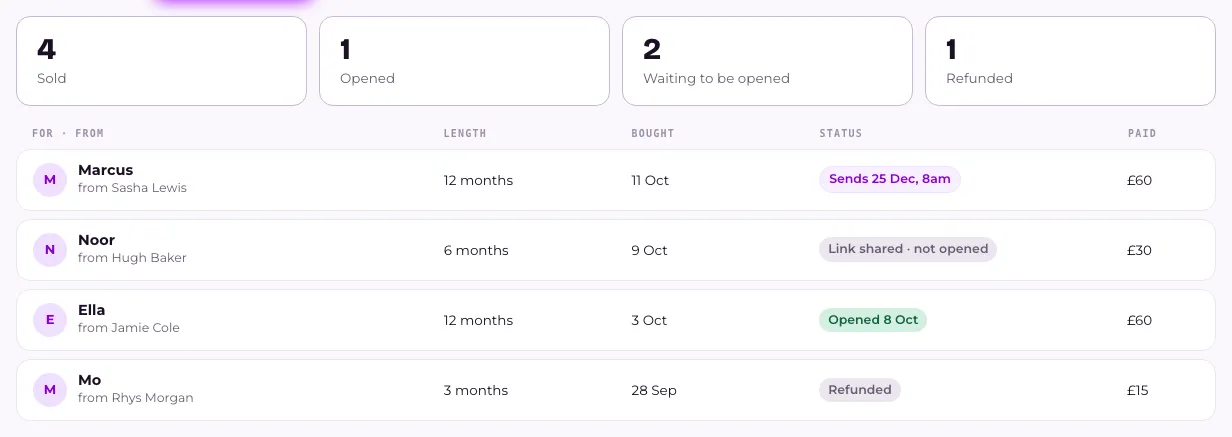
Sales are in Members, on the Gift memberships tab. Each row is tagged, for example Link shared · not opened, Opened, or Refunded. Gift members on the Members list carry their own tags.
Refunds, and when it ends
Section titled “Refunds, and when it ends”Refunds are made in Stripe, and show here as Refunded. Refund a gift before it’s opened and the link stops working. Refund one that’s already been opened and the membership still runs to its end date. The row reads Refunded · already opened.
Gift members count as active members on your Flub plan while their gift runs. Once it ends they stop counting, unless they carry on paying or do something that counts.
We email the member 30 days and 7 days before their gift ends. They can press Carry on to start paying, with nothing taken until the day it ends. If they don’t, their membership goes on hold. The buyer is never contacted or charged again.
If your club closes
Section titled “If your club closes”When you close a club, or stop using Flub, a gift link that hasn’t been opened says “We’ve closed our club, so this gift membership can’t be opened.” We stop sending gift emails and the 30-day and 7-day reminders. Gifts already sold aren’t refunded or honoured by us: how you honour them is up to you. The closing page tells you how many are still unopened. If you reopen in time, emails that were waiting go out.
Related
Section titled “Related”© Flub 2026 | What's new | useflub.com
Flub is a trading name of FLUB INDUSTRIES LTD, a company registered in England and Wales (no. 17491066). Registered office: The Workstation, 15 Paternoster Row, Sheffield, S1 2BX, United Kingdom.