When do members see the changes I make in Your club?
When you press Save. Changes to an offer, a club perk or Look wait in a bar at the bottom of the page until you save them, and members see the saved version until then. On and off switches are the exception, and act the moment you press them.
Last checked 14 October 2026
Members see a change when you press Save. Anything you change on an offer, a club perk or Look waits until then, and members keep seeing the saved version. Switches are the exception: turning an offer on or off happens straight away, unless members hold it and we ask whether they keep it or you take it back.
How it works
Section titled “How it works”Change something and a bar appears at the bottom of the page: “1 unsaved change · members still see the saved version”. Review lists what’s changed. Press Save, or Discard to put it all back.

Once it’s saved, the bar says “Saved · members see it now”. If members already have your pass, it adds that passes update within a few minutes.
While you have unsaved changes:
- the card preview on an offer’s page says Not saved yet;
- that offer’s line in the menu says Unsaved changes;
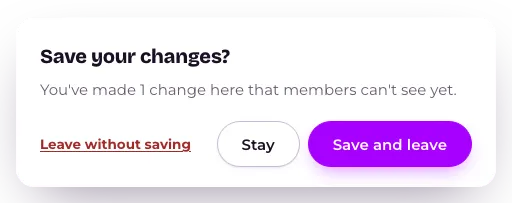
- leaving the page asks Save your changes?, with Save and leave, Stay and Leave without saving.
On a phone, Save is in the strip at the bottom of the screen, or at the top right when an offer’s full-screen editor is open.
If something needs fixing first, the bar says “Not saved — 1 thing to fix”. Press Go to it to jump there.
Before you launch, nobody can see your club yet, so Save simply keeps your changes. Launch comes back once everything is saved.
When we check first
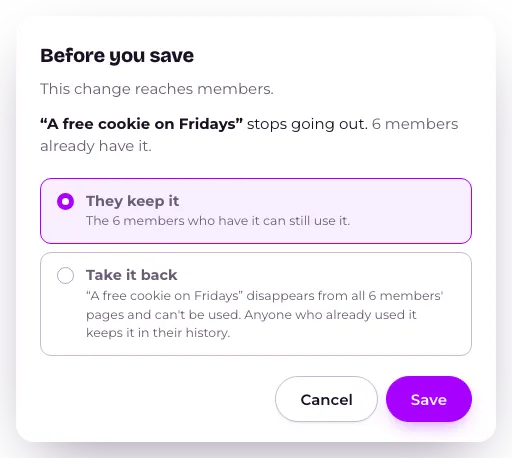
Section titled “When we check first”On Weekly & monthly offers, Treats that keep coming and the Stamp Card, a save that would stop something members already hold asks first, in Before you save. It names each offer that “stops going out”, and how many members already have it. On Weekly & monthly offers and Treats that keep coming you choose They keep it or Take it back (see How do I take an offer back?). For a new Stamp Card count, see How do I change the number on the Stamp Card? Press Save to go ahead, or Cancel.
Anything you remove stays on the page, struck through, saying Removed when you save, with Undo beside it.
The words on an offer
Section titled “The words on an offer”Change what an offer gives and we rewrite its words to match. If you wrote the words yourself, we leave them alone and say “These words still describe the old offer.” Press Rewrite with AI or Keep my words. Save waits until you choose.
Related
Section titled “Related”© Flub 2026 | What's new | useflub.com
Flub is a trading name of FLUB INDUSTRIES LTD, a company registered in England and Wales (no. 17491066). Registered office: The Workstation, 15 Paternoster Row, Sheffield, S1 2BX, United Kingdom.